
| Training Notes - Formatting a Chart |
The Draw Chart dialog is the main way to edit the settings to format the Daisy Chart. Just click on the appropriate button.
The settings for the chart drawn in Building a Chart are shown.
Some of the more common changes are listed :-
These are followed by a road map of where various settings in the chart are changed.Histograms
Histograms sets the fill and annotation style, the ratio of the nodes and histograms to the radius of the Daisy Chart and the aggregation fields to be drawn as histograms. The tab control at the top of the dialog box, sets the various styles and sizes. Experiment here to get the format you want. The settings shown, will fill all the histograms, line them with a single black pixel and add annotations, showing their values. To draw a particular aggregation field as a histogram, just click on the check box, choose the scale and then enter any scale. The scales for the histograms are listed below.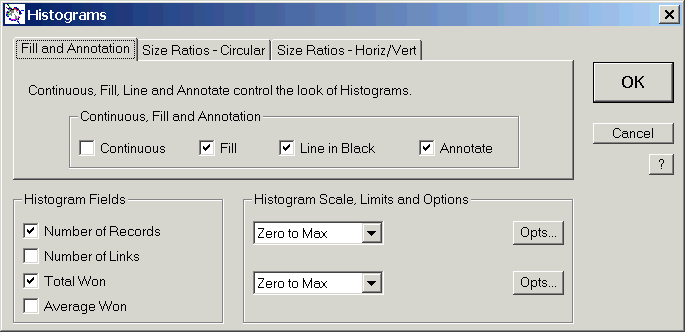
Node Size
The node size is defined as a ratio to the radius of the chart. (For Active Histograms the width is used. The easiest way to change the node size is to use Setup in Node Style. Just enter the new values. In a typical Daisy Chart, such as the Newmarket Winners example, often you only want to look at the most important nodes and not all of them. In this example, only the first 12 nodes in each mapping are shown. This is an important technique that is controlled from the Node Limits dialog in Draw Chart. Note that the dialog shown is from Daisy Standard. The smaller versions do not allow First, Last and First and Last selections. The various command buttons of Draw Chart and what they control are listed.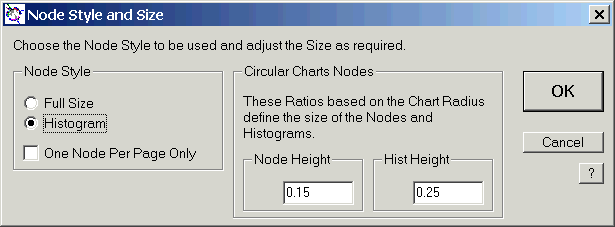


| Mapping Fields | Mapping Fields, Types and Formats Mapping Titles Node Order Mapping Error Handling |
|
| Combine | Combined Field Node Order | |
| Aggregation Fields | Aggregations Totals, Averages Previous Values on Node Add, Subtract, Multiply Node Values |
|
| Weighting | Weighting Field and Type | |
| Selection | Selected Records | |
| Calculation | Links Drawn or not Combined Mapping |
|
| HTML Charts | HTML Charts | |
| Node Style | Full Size Nodes Histograms Chart and Node Size Ratios |
|
| Links Limits | Drawing Limits for Links | |
| Nodes Limits | Drawing Limits for Nodes | |
| Layout | Legend Drawn or not Titles Node and Histogram Keys Title and Key Fonts |
|
| Nodes and Links | Node Layout Node Fonts and Orientation Rules for Names in Node Boxes Aliases for Names in Node Boxes |
|
| Histograms | Histograms Node/Histogram Ratios Histogram Annotations or not Histogram Fill or not Histogram Scales |
|
| Colours | Node Colours Histogram Colours |
|
There is also an Index to everything to do with drawing charts.
Daisy Index |