| Training Notes - Mapping Fields |
Mapping fields are used to translate the database into a Daisy Chart.
Consider the example, where a field, Fault, is mapped with a mapping type of Text and a mapping format of the same name.
For each different value of the field, a new node will be created in the chart in the arc or group corresponding to the mapping field, Fault.
In our example, the nodes created could be Call Help, Dial, Mail, Network, Response, Carrier, Reset and Ring. (See the Software Test example, which is just such data.)
Each node is now a set of values in its own right. It has a node name, a node group, which in simple mappings is the mapping field and various numeric values. These include the number of records and links and any aggregated values. All of the numeric values can be drawn as histograms on any node.Mapping is described in detail in Section 5.2 of the Daisy Manual, with the more important points covered in these notes :-
Remember though to keep your mapping simple and with a limited number of nodes. Or at least initially.
Each mapping field is actually defined using a mapping type, a mapping format and an optional mapping title.
There are four mapping types :-
The mapping format is applied to each mapping field to change the data into the form required for mapping.
Consider as an example, the Month-Year format, which acts on dates. This would transform November 12, 2001 to Nov-2001.
Daisy contains many different formats, for mapping text, dates, times and numerics. Special forms allow the mapping of phone numbers, post codes and E-Mail addresses.
The optional mapping title is used as a legend for the mapping field, if it has been entered.
Details of mapping types and formats are given in Appendix A of the Daisy Manual.
There is a tremendous temptation to throw everything at Daisy and let the program sort out the information.
It doesn't always work!
Consider analysing the duration of a telephone call. This would have values like 20, 24, 72 seconds etc.
If you used the simple mapping format, Numeric, each different value would create a separate node, so you'd have as many nodes as different numeric values. This could mean that in our example, you might have as many as 300-400 nodes for only about 5,000 records!
Perhaps, not very useful!
Try to map a field so that it produces less than 20-30 nodes. With numerics using the mapping format, Partition with a suitable step value, will generally do the trick, by creating a series of nodes, 0 to 15, 15 to 30 etc.
This gives the following advantages :-
Using a mapping field with a mapping format of Text is probably the most common of all mapping done with Daisy.
It is also the simplest, as it just maps the values as they are stored in the database. Miller gets mapped to the node, Miller, Smith to Smith etc.
By default, the nodes will be shown in descending order of weighting or if that is not set, then number of records.
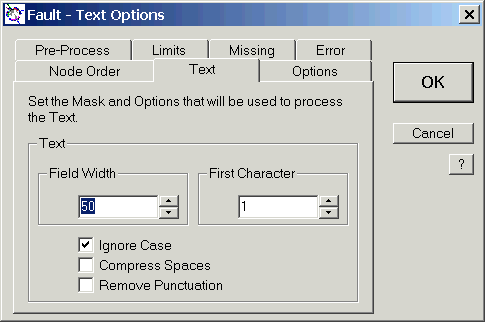
The sort order and other options are set from the dialog shown, which is called from the Opts button in the mapping dialog.
Note that in this example, case is being ignored.
Day of the Week or Day of Week is one of the most important mapping formats and it should always be applied to a field believed to be a date.
Often databases also have a time field and this should be mapped as say Hour, as the resulting Daisy Chart has a pattern that gives a powerful insight into the data.

This type of Daisy Chart should always be drawn for any date and time-based database. And that is probably about 70 % of all databases!
Note that if you want to display all records for Wednesday and between 8 and 10, this can be done using the simple Point and Click method of selection, called from the Selected Records command in the View menu.
Hour of the Day or Hour is one of the most important mapping formats and it should always be applied to a field believed to be a time.
Often databases also have a date field and this should be mapped as say Day of the Week, as the resulting Daisy Chart has a pattern that gives a powerful insight into the data.
This type of Daisy Chart should always be drawn for any date and time-based database. And that is probably about 70 % of all databases!
This may seem rather deja-vu. It is!
It is also very important that you map this type of database in this way!
Daisy was designed with the analysis of phone numbers in mind and includes several mapping formats specifically for this purpose :-
A few rules to bear in mind about the input data :-
Daisy will try very hard, but the results can't always be predicted if a database contains local numbers, such as 783789, and full international ones, such as 441440783789.
Ignore this section if you work in one of those countries with boring Post or Zip Codes!
Daisy has two extra mapping formats for UK Post Codes :-
Use both of these mapping formats to reduce the number of nodes when mapping UK Post Codes.
Note that Daisy Standard can draw maps of UK Post Codes and also link them to the Internet.
Partition is the standard solution for mapping numeric fields.
If a field is mapped using Partition with a step value of 5, then the nodes will be 0-5, 5-10, 10-15 etc.
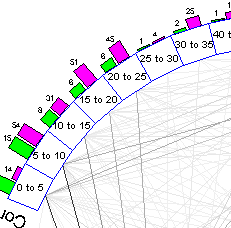
This mapping format greatly reduces the number of nodes created.
One point to note is that if you have too many nodes and want to reduce them, then you just increase the step value. Similarly, with too few, you just decrease it.
Soundex is a coded index based on the way a name sounds rather than the way it is spelled. Names that sound the same, but are spelled differently, like Miller and Millar, have the same Soundex code and are filed together. The code for both is M460.
The Soundex coding system was developed so that you can find a name even though it may have been recorded under various spellings.
View the National Archives and Records Administration Pages on Soundex!
Daisy can map names and other text strings, by their Soundex codes. This technique can be used to check databases for duplicate entries, where names and other details may have been misspelled.
List is a special mapping format designed to show the first few nodes of a particular field and then group all the others into another called typically, Other.
Shown is the TelephoneCalls example, but with the exchanges mapped with a format of List.
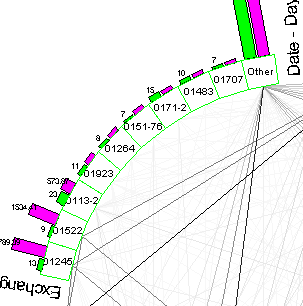
Note the node, Other.
This mapping format is setup in the same way as all others, but it only works on text fields. It is only available in Daisy Standard.
These notes have only introduced a few of the around 100 different mapping formats that are available.
The full list is given in Appendix A of the Daisy Manual.
Some of the more important ones are :-
Daisy Index |