 | Features - Daisy Opener - Databases and Templates |
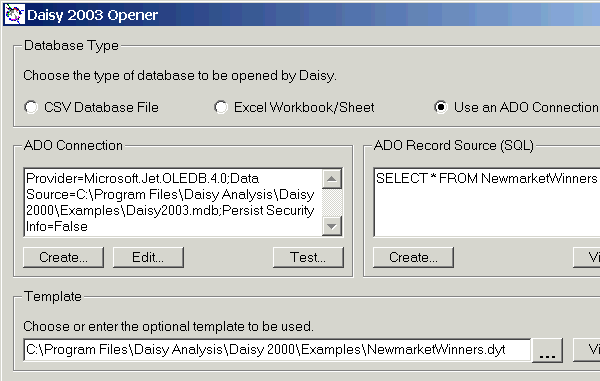
Three types of database can be opened by the Daisy Opener :-
- CSV Files with the field names in the first record.
- Microsoft Excel workbooks and the included worksheets.
- ADO databases.
Opening of an ADO database is shown.
Note Create..., Edit... etc. under the ADO Connection and the Record Source. Use them to create and modify the settings.
A suitable template is then chosen, if one is to be used.
Make sure that it is compatible with the database to be opened.
Several of the profiles delivered with Daisy have been setup so that they will open the same database in the three different ways possible.
Open the 'Newmarket Winners' profile and then try it on all three databases.
See Daisy Opener - Opening Databases in the Help for more details.