Toolbar Style
Toolbars in Daisy can be shown with the buttons in one of three styles.
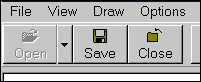
Large Icon
In this style icons are shown with text.
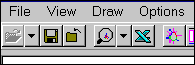
Small Icon
Here just the icons are shown.
Text Only
Just the text is shown.
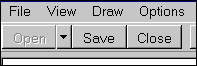
Just click any of the images above to change the toolbar style.
Toolbars in the Help are only shown in the default style.