Investigate Node
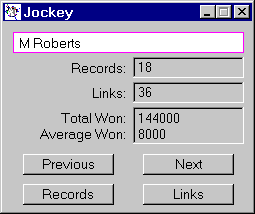
Shown below is a typical investigation window or dialog that you get by clicking on any node in a Daisy or other chart.
Note that all aggregation fields; 'Total Won' and 'Average Won' etc., are shown in this dialog.
Click the various buttons to navigate around the chart and also to display the underlying information as Daisy Grids :-
You can have more than one investigation dialog visible at the same time. Adjust the number allowed using Views/Grids/Investigations in the Options menu.